AppDaemon Add-on
The AppDaemon python package and the AppDaemon Add-on for Home Assistant (maintained by Frenck) have no official relationship. They have different versions and release schedules, but are both commonly run using Docker containers. The AppDaemon project provides a Docker container, and the add-on uses another one that includes some things to help it integrate with Home Assistant’s Supervisor.
Note
Add-on Repository: hassio-addons/addon-appdaemon
AppDaemon Repository: AppDaemon/appdaemon
Workflow
An easy way to work with the AppDaemon config files is to expose them with a Samba share, which uses smb to make folders accessible across a network. This is an old, well-established standard that works really well across platforms. The Samba add-on makes the AppDaemon config folder accessible at addon_configs/a0d7b954_appdaemon. That share can be mounted on your local system as a network drive where it can be accessed with an IDE like VSCode or PyCharm.
See this section of the Home Assistant docs for more information about accessing samba shares.
Paths
Name |
Inside Container |
Samba |
Host |
|---|---|---|---|
Home Assistant config |
/homeassistant |
/config |
/mnt/data/supervisor/homeassistant |
AppDaemon config |
/config |
/addon_configs/a0d7b954_appdaemon |
/mnt/data/supervisor/addon_configs/a0d7b954_appdaemon |
Home Assistant Media |
/media |
/media |
/mnt/data/supervisor/media |
Home Assistant Share |
/share |
/share |
/mnt/data/supervisor/share |
Config
Token
The authentication token for the Hass plugin is automatically provided by the Hass Supervisor using the SUPERVISOR_TOKEN environment variable.
System Packages
System packages are installed into the container environment using apk before AppDaemon is launched. Anything from the Alpine Package Index can be used.
For example, to install pandas:
py3-pandas
Tip
Many python packages can be installed this way, which is much faster and more reliable than using pip. The packages usually have a py3-*prefix.
Python Packages
Python packages are installed into the container environment using pip before AppDaemon is launched. Any package on PyPI can be used. Pip also supports targeting VCS systems, so any python packages on GitHub can be installed directly in several ways:
git+<github_url>@<branch>git+<github_url>@<short commit hash><github_url>/archive/refs/heads/<long commit hash>.zip
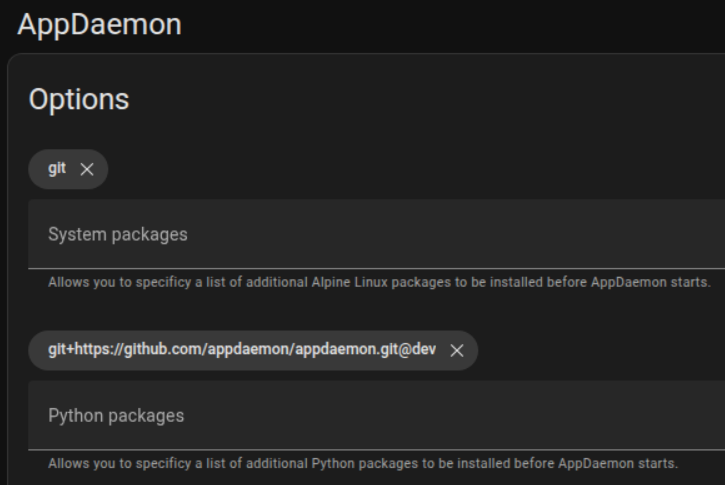
Tip
The add-on will use the version of AppDaemon installed from GitHub in the example screenshot above. This makes it easy to control which version of AppDaemon the add-on uses.
git+https://github.com/AppDaemon/appdaemon@devgit+https://github.com/AppDaemon/appdaemon@4.4.2git+https://github.com/AppDaemon/appdaemon@beaa161
Docker Mechanics
This section shows some of how the AppDaemon add-on container works in the supervised environment of Hass OS and is just for informational purposes. It uses the Advanced SSH & Web Terminal Add-on to inspect the Docker container.
Warning
Protection mode has to be disabled for the SSH add-on for the following instructions to work. It’s recommended to only disable it temporarily. Proceed carefully and at your own risk.
Check the status of the AppDaemon container
docker ps --format "table {{.ID}}\t{{.Names}}\t{{.Status}}" | grep appdaemon
Check the AppDaemon container logs
docker logs --tail 10 addon_a0d7b954_appdaemon
Enter the AppDaemon container
docker exec -it addon_a0d7b954_appdaemon /bin/bash
Show volume mounts from the AppDaemon container
docker inspect --format='{{json .Mounts}}' addon_a0d7b954_appdaemon | \
    jq -r '.[] | select(.Type == "bind") | [.Destination, .Source] | @tsv'
View installed Python packages
docker exec addon_a0d7b954_appdaemon pip list